How to Write Call-to-Action (CTA) Text for Websites and Newsletters
17. 5. 2026
ATWEL specialist
Categories: email marketing, Online marketing, WordPress website management
Well-written call-to-action text helps increase website conversions and overall success of PPC or email campaigns. This makes it a critical element of websites and newsletters that definitely deserves your attention. Try our collection of tips for creating CTA text that converts.
What Does CTA – Call to Action Mean?
Call to Action, abbreviated as CTA, is an interactive website element designed to prompt visitors to take a specific action. Through CTAs, you’re essentially telling users what to do on a given page to reach the desired goal—conversion.
CTAs embody the fundamental marketing principle: “If you want something from users, just tell them.” This benefits both parties:
- For customers: Simplifies website navigation
- For you as the website owner: Drives revenue
CTAs most commonly appear as buttons with text that users click to reach a landing page, form, or similar destination. You’ll encounter them on websites, in newsletters, PPC ads, or social media, where they encourage users to download an e-book, register, or submit a contact form.žení e-booku, k registraci nebo k odeslání kontaktního formuláře.
How to Increase Website Conversion Rates and Newsletter Success? Try Optimized CTAs
After the main headline, CTAs are the most important element of web pages—headlines bring visitors in, and calls to action drive them to complete conversions.
Picture an e-commerce store selling Nike shoes. A user searches for “Nike Air Max.” Your store appears in search results, advertising shoes in stock. The user visits your page, likes the shoes, then notices you only have two pairs left. They quickly check available sizes and click “Add to Cart”—the CTA.
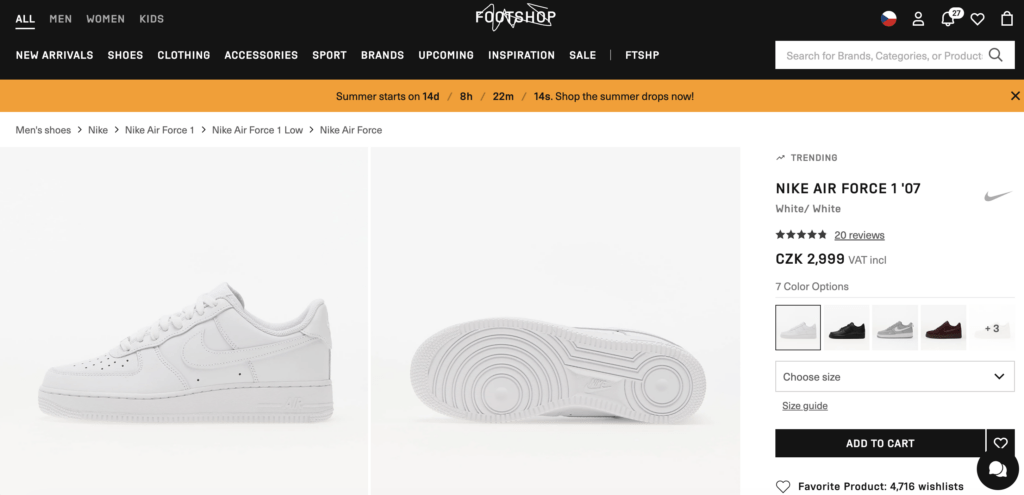
The availability mention captured the customer’s attention and motivated faster action. The CTA fulfilled its purpose, reinforced the website’s goal, and prompted customer action.
Similar techniques work for corporate websites and newsletters—just consider how to best motivate visitors and design prominent CTAs with compelling text. When done right, CTAs can significantly boost website conversion rates and newsletter performance.
How to Write CTA Text
JBefore designing CTAs for your website or newsletter, clarify three things:
- The conversion path
- What users should do and what happens next
- Your target audience
The conversion path relates directly to website structure and UX design. Each page should have a clear goal that CTAs guide toward—if you don’t know this goal, neither will your visitors.
Understanding your target audience is crucial when crafting CTA text. Quality copy—whether for CTAs, blogs, or newsletters—is always created with a specific audience in mind. Customer personas—representations of targeted user groups—can help with this.
What Makes Effective CTA Text for Websites and Newsletters
Good CTA text is concise and clear. Users understand what happens when they click and the benefits of downloading that e-book, making a purchase, or registering. Follow these three principles:
- Brevity: CTA buttons average 35 characters
- Personalization: First-person text typically performs better
- Transparency: Visitors should understand what follows their click
Effective CTA text varies by project, so experiment with imperative statements or numbers.
Supplement CTA button text with a headline explaining why visitors should click. Take a psychological approach—appeal to emotions. People typically want what others have. For e-books, mention how many users have already downloaded it.
Create urgency for visitors. Time-limited offers with countdown timers are effective. Product availability, as shown above, also works. Fear of missing out on desired products can drive faster purchases. Benefits like extended warranties or free shipping are also compelling.
Always stay on topic, don’t overpromise, and sell your unique value. Avoid generic text and promote your main benefit. For example, instead of just “Register” for a ticketing system landing page, specify the user benefit: “Take Control of All My Tasks.”
Need Professional CTA Optimization?
If you’re looking for someone to handle complete newsletter preparation or website development, don’t hesitate to contact us. We’ll provide guidance and ensure higher conversions.